Free plugin · beta
Muhasebe Köprüsü for WooCommerce
Orders reach your e-invoice provider without typing them again.
Version 1.0.1 · 131 KB · WordPress 6.5+ · PHP 7.4+
- WooCommerce compatible
- HPOS
- Beta
Where does the data go?
- WooCommerce orderTCKN / VKN, KDV, shipping, coupons
 Accounting Bridgequeue, retries, log
- Your Paraşüt or Uyumsoft accountthe GİB-licensed integrator issues the invoice
- e-Arşiv / e-Faturanumber, ETTN and PDF come back to the order
How it works
Three steps to set up; the plugin does the rest.
-
1
Connect your account
Your own Paraşüt or Uyumsoft API details, stored encrypted, with a connection test.
-
2
Choose the rules
Which order status triggers invoicing and the tax class → KDV mapping.
-
3
Orders are passed on
Invoice number, ETTN and PDF are written to the order; the queue retries on errors.
Key features
Passes your WooCommerce orders to the Paraşüt or Uyumsoft account you already use. The plugin does not issue invoices: in Türkiye e-Fatura and e-Arşiv are issued only through a GİB-licensed integrator, which issues, signs and reports the invoice.
Paraşüt and Uyumsoft
Paraşüt API v4 (OAuth2) or the Uyumsoft e-Fatura / e-Arşiv web service; live / test.
TCKN / VKN check
Individual / company invoice fields on the classic and block checkout.
KDV mapping
Tax class → 1 %, 10 %, 20 %, 0 % with an exemption code; shipping, fees and coupons included.
Queue and retries
Temporary errors are retried after 1, 5, 15, 60 minutes and 3 hours; never invoiced twice.
Encrypted credentials
Passwords, client secret and tokens are stored with AES-256-GCM.
Log and CSV
Filterable queue, invoice status column in the order list, invoice CSV export.
Connection, queue, log
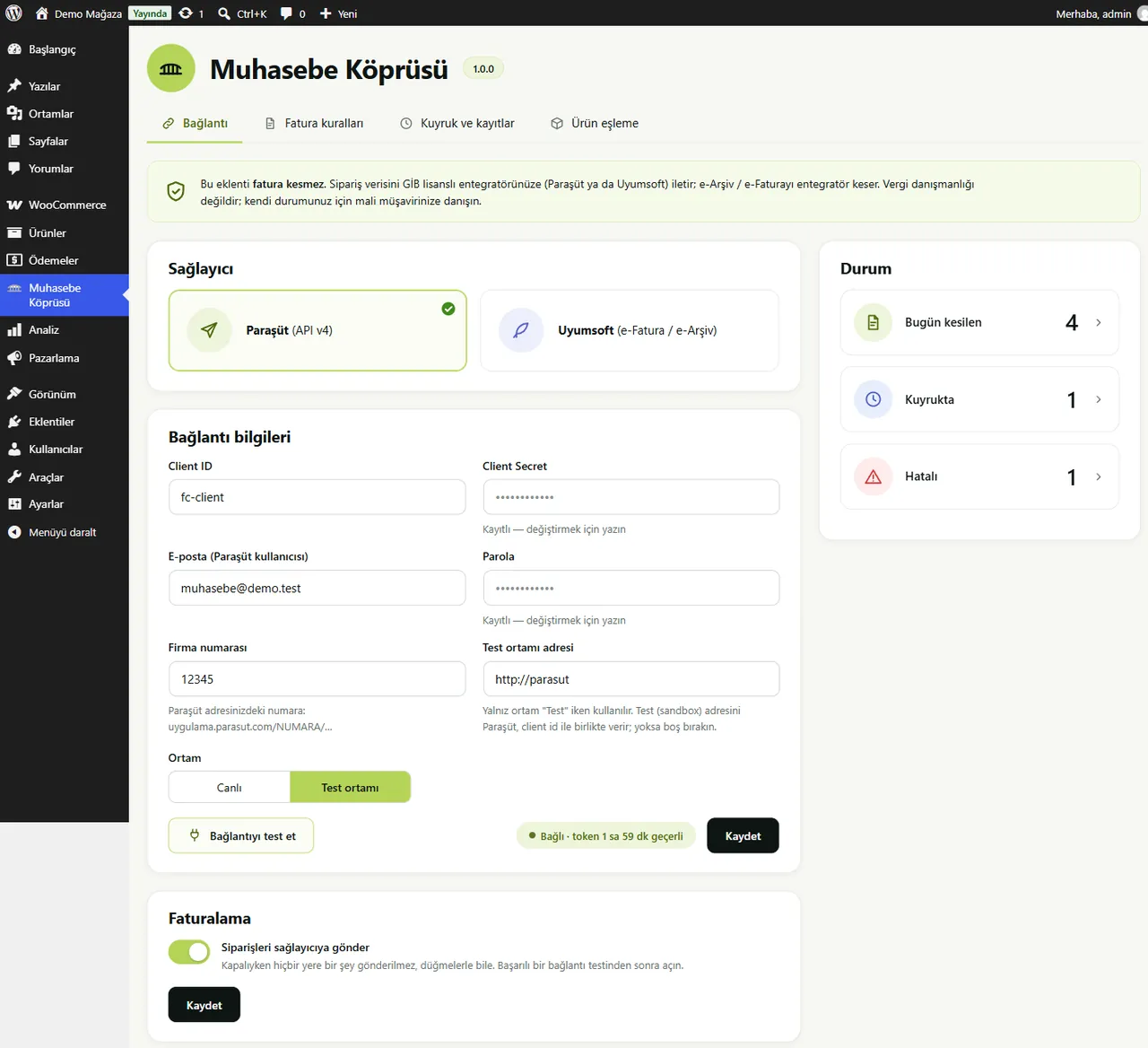
On the Connection screen you choose the provider, enter your own details and test the connection.
- Provider choice and connection test
- Live / test environment
- Invoice queue with one-click resend
- Invoice box in the order: number, ETTN, PDF
Paid alternatives: ₺6,000/year, free here.
Accounting Bridge is free and GPL licensed; no feature is locked by a licence. Source: market research, October 2026. Price range of paid alternatives today.
Beta note: The plugin was written from the providers' documentation and tested against a mock server; it has not yet been verified with a real Paraşüt or Uyumsoft account, so it is not connected in the demo shop.
Frequently Asked Questions
From the plugin's readme file.
Does this plugin issue invoices?
No. Only a GİB-licensed integrator issues e-Fatura and e-Arşiv invoices. The plugin sends the order data to your Paraşüt or Uyumsoft account; they issue the invoice.
Is this tax advice?
No. Ask your accountant about KDV rates, exemption codes, series and cancellations.
Can an order be invoiced twice?
No. The order is locked while it is processed and every remote id is stored at once and re-used by a retry.
How do cancellations and refunds work?
e-Arşiv invoices can be cancelled within the provider's period; e-Fatura cannot be cancelled through the API; partial refunds get an order note only.
Why "beta"?
End-to-end verification with a real Paraşüt or Uyumsoft account has not been done yet. This note goes away when it is.


