
Free plugin
Bayi Portalı for WooCommerce
A B2B shop for your dealers, next to your retail shop.
Version 1.0.1 · 122 KB · WordPress 6.5+ · PHP 7.4+
- WooCommerce compatible
- HPOS
- Turkish & English
How it works
Three steps to set up; the plugin does the rest.
-
1
A dealer applies
The tax number is checked with the official algorithm; you get the application.
-
2
You approve into a group
A / B / C groups with a discount, minimum amount and quantity each.
-
3
They buy at their price
Price list, quick order, quotes and orders under "My account".
Key features
Companies apply with their tax number, you approve them into a dealer group, and from then on they see their own prices, order by SKU and ask for quotes.
Applications and approval
VKN / TCKN checked form, approval with a note, bulk actions and e-mails.
Clear price precedence
Product / variation price, then category rule, then group discount; never above an active sale price.
Hidden prices
Hide prices from guests or non-dealers; "+ VAT" display for dealers.
Minimums and pack sizes
Minimum amount and quantity per group, pack size per product; checked in classic and block cart.
Quotes
A dealer turns the cart into a quote, you edit and approve, they turn it into an order with one click.
Price list CSV
Export, import and template by SKU; Turkish number format, opens in Excel.
Groups, rules, applications
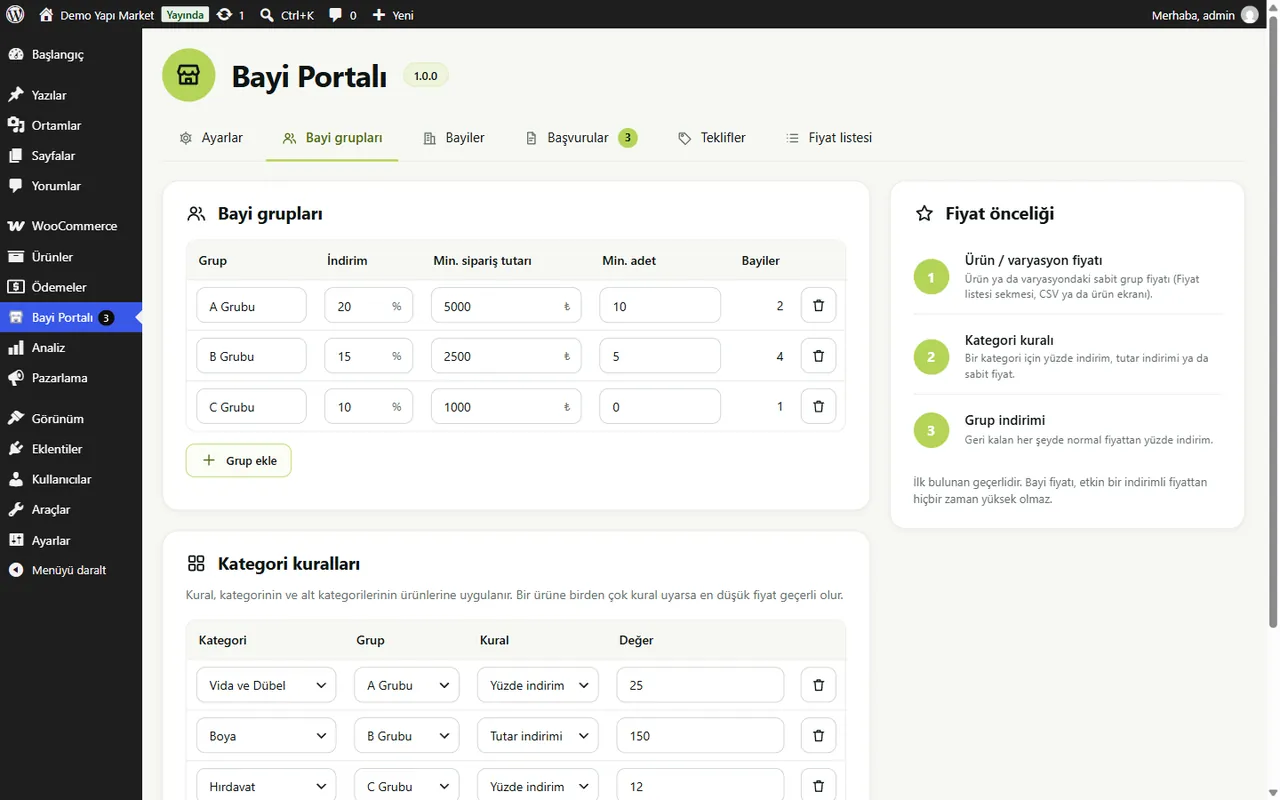
The Dealer groups screen shows discounts, minimums and category rules together with the price precedence.
- A / B / C dealer groups
- Category rule: percent, amount or fixed price
- Bulk approval and group assignment
- Quote management with validity date
Paid alternatives: $99/year, free here.
Dealer Portal is free and GPL licensed; no feature is locked by a licence. Source: market research, October 2026. Price range of paid alternatives today.
Frequently Asked Questions
From the plugin's readme file.
Which price wins?
First the group price on the product or variation, then a category rule, then the group discount. The lowest matching category rule wins; a dealer price is never above an active sale price.
Does the quoted price change at checkout?
No. The quoted items go into the cart with the quoted prices and quantities and the order keeps them. Expired quotes cannot be ordered.
Does it work with my cache plugin?
Yes, with any cache that skips logged-in users. The plugin sets DONOTCACHEPAGE and no-cache headers for logged-in dealers.
Can I make an existing customer a dealer?
Yes: choose a dealer group on the user profile or use the bulk action on the Users screen.
Are prices with or without VAT?
Enter dealer prices the same way as your product prices. With "Prices without VAT for dealers" on, dealers see "+ VAT" prices; WooCommerce taxes must be on.


